Laya
Private (recommended)A small on-device model. Nothing leaves your Mac, and once downloaded it needs no key and no internet.
- DownloadAbout 1.1 GB, once
- HardwareApple Silicon only
- Leaves the machineNothing

SLM tells your agent whether the top memories actually answer the question, or are just the nearest thing on file. Private on-device judge, optional online one, nothing hidden either way.
Recall can return the closest match even when it does not answer the question. The answer check adds a second step: it judges whether the top results actually answer, and recall marks them abstained when they do not.
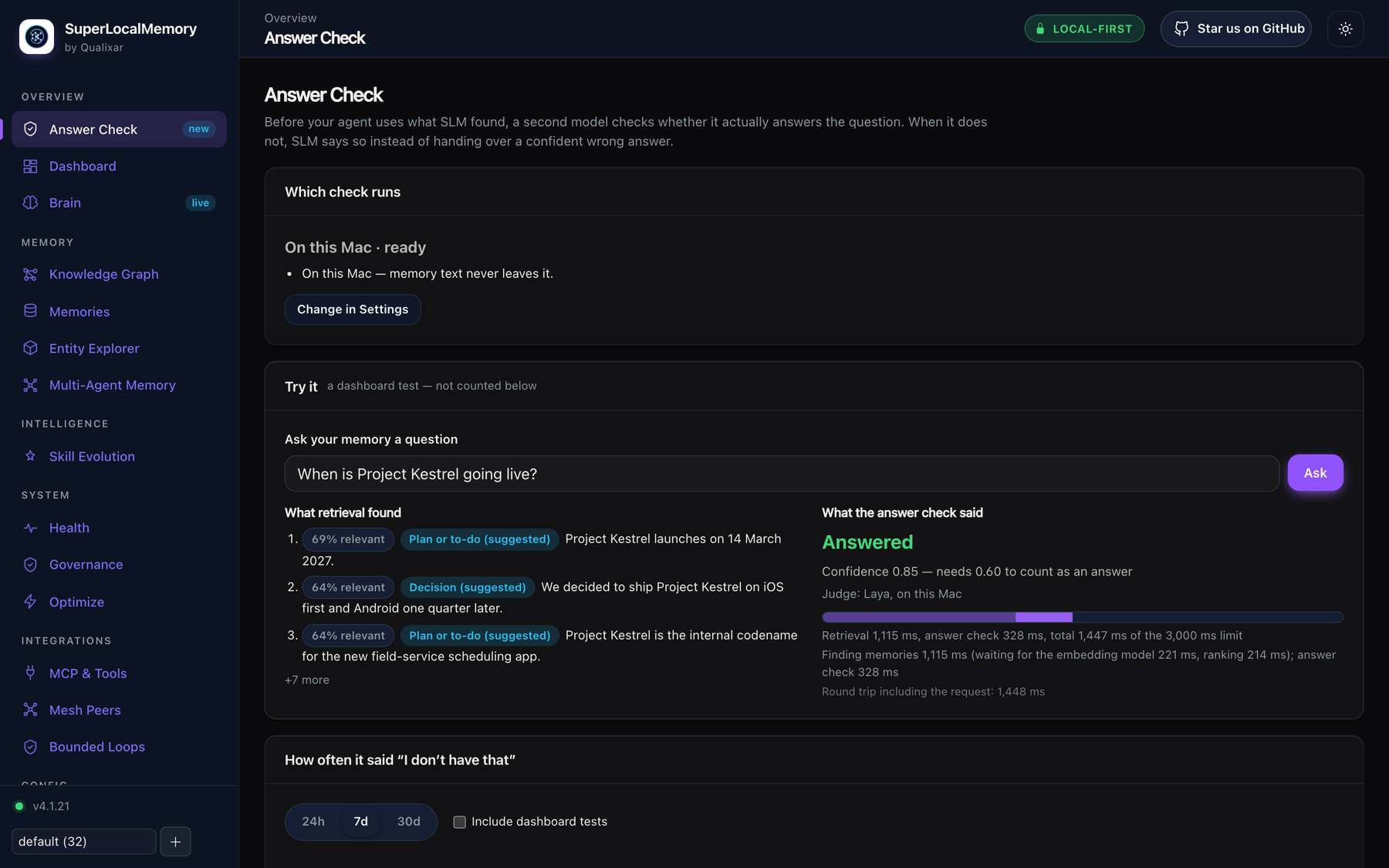
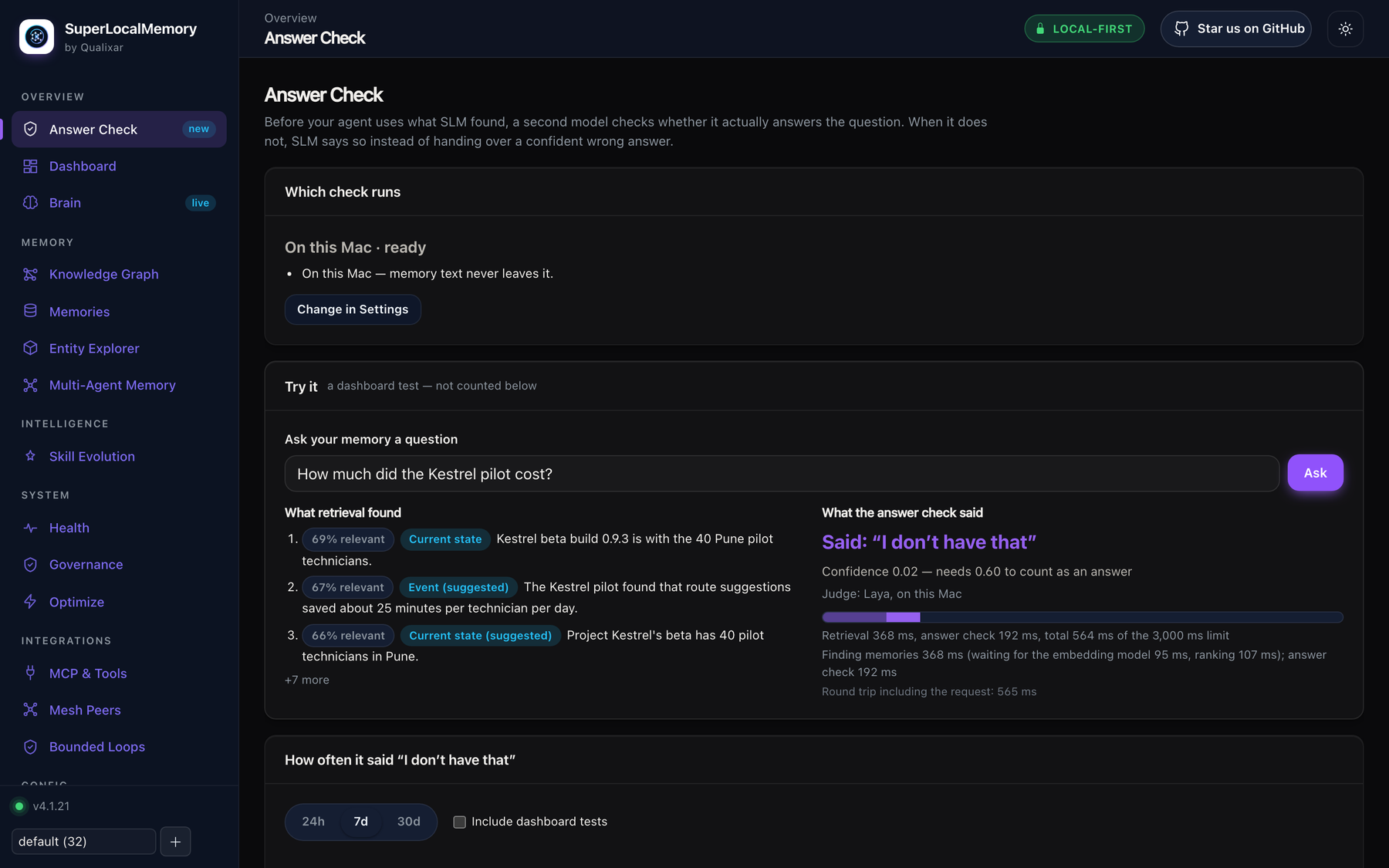
Both screenshots come from a real install with fictional project memories. Nothing is mocked. Select either image to open it full size.
Set it in Settings → Answer check. Private and on-device, online with your own key, or off.
A small on-device model. Nothing leaves your Mac, and once downloaded it needs no key and no internet.

An online judge for Windows, Linux and macOS. Your own key, an explicit consent, off until you turn it on.
Recall behaves exactly as before.
Only one runs at a time. Turning one on turns the other off. There is no mode where both run together, and the online option never turns itself on.
Inside the online option there is one more switch, Also use Jev to reorder results. It is off by default, it has its own notice, and it exists only with Jev. Laya never reorders.
How often the memory that answers the question came first. Public benchmark of long conversations (LoCoMo), 1,531 questions.
“When on, each recall sends your question and its top 20 memories to TypeSafe to choose the best order. Don’t use this for client, confidential or personal material.”
The notice you see in the dashboard. It names the provider you actually chose.
Every recall now carries a verdict the agent can act on, instead of guessing.
When the check has not run, because it is off or still starting up, no extra line appears and recall output is exactly what it was before. Skipping costs the verdict only; results are identical whether the check ran or not.
All in the dashboard. History stays on your machine for 30 days and never stores your questions or memories.
slm setup --no-laya or set SLM_SKIP_LAYA=1 first.For the answer check, the answer is decided by the option you pick. The check only ever sees the handful of results recall was already about to return to you. It never runs its own separate search.
| Data | Leaves only when |
|---|---|
| Recall question and top 3 memories | Only when you turn on the online answer check (Jev) and tick its consent box. Credential-shaped text is stripped first. |
| Question and top 20 memories | Only when you also turn on Jev reordering, which has its own notice. |
| Nothing (Laya) | Never. The on-device check sends nothing about your questions or memories anywhere. |
| Model downloads | Downloads send no memory content. |
Credentials in memory text are redacted on every outbound path. Ordinary personal details are not stripped, so don’t turn the online option on for memory stores that hold client, confidential or personal material.
| Platform | SuperLocalMemory | Jev (online check) | Laya (on-device check) |
|---|---|---|---|
| Apple Silicon macOS | Yes | Yes | Yes |
| 64-bit Windows | Yes | Yes | No (Laya uses Apple’s MLX) |
 64-bit Linux (x86-64, ARM64) 64-bit Linux (x86-64, ARM64) | Yes | Yes | No |
| Intel Mac, 32-bit Windows | No prebuilt install | — | — |
No. Choosing “On this Mac” never requires a key or an internet connection once the model is downloaded. The download is about 1.1 GB, happens once, and the model uses about 1.1 GB of memory while it is on. Nothing about your questions or memories leaves the machine.
It depends who is asking. People see the closest memories, marked related: the CLI, the dashboard search and the search tool return up to three with a plain note. The agent recall tool returns nothing and says so, unless the agent asks with include_related — because an agent must not present a near-miss as the answer. Only the order of the top results can change, and only if you turn on Jev reordering.
Laya needs Apple Silicon. Use the online option with Jev instead, which works on Windows, Linux and macOS through TypeSafe or OpenRouter with your own key, or leave the answer check off.
No. The online option is off by default and stays off until you add a key and tick the consent box. Upgrading never turns it on, switching SLM’s mode never turns it back on, and only one check runs at a time. Withdrawing consent turns it off immediately.
Laya has no per-use cost and needs no key. The online option uses your own key with the provider you choose, TypeSafe or OpenRouter, and you pay that provider directly. Each Test button press is a real request and uses a little of your credit. Recalls that only load context, such as session start, are never judged, never sent anywhere and never billed.
Relevance asks how close a memory is to your question. Answer check asks whether the top results actually answer it. A memory can be the closest match SLM has and still not answer what you asked. Recall ranks first, then the answer check adds a separate verdict on top, and the support check decides the tier: a supported answer, the closest memories marked related, or nothing with a plain “not in memory” note.
Install SuperLocalMemory, pick Laya or Jev in Settings, and let your agent say “I don’t have that” instead of guessing.
Read the guidesAnswer check guide · Recall guide · Configuration